iPhone · screen time to read

Read more books, starting tonight

Choose when you want to read. BookGate rings at that hour, puts the physical book in your hands, and shields the distracting apps you selected for the length of the session.

iPhone · Try every feature free for 3 days

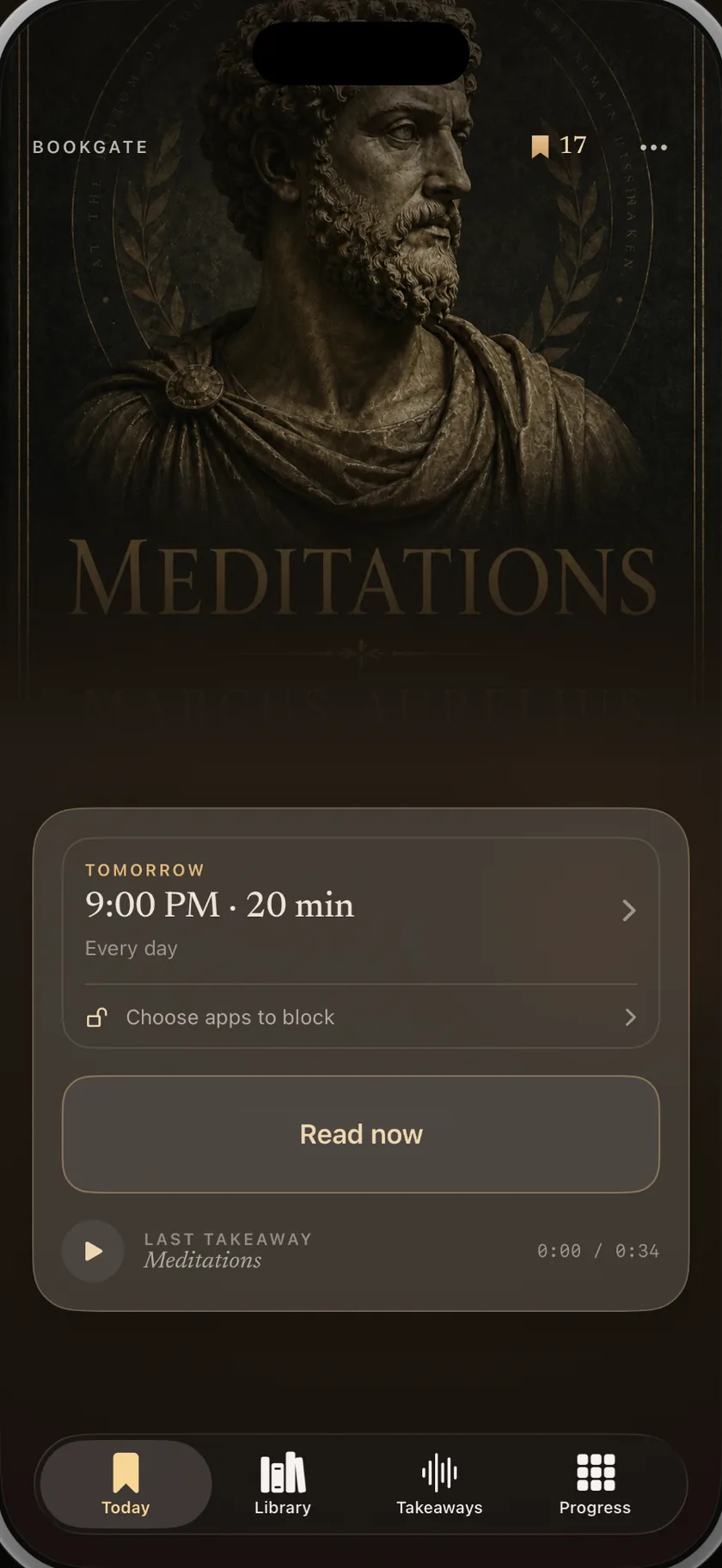
The BookGate Today screen: tonight’s book, the alarm set for 9:00 PM for twenty minutes, a Read now button and last night’s spoken takeaway.

In one paragraph

BookGate is an iPhone reading-habit app that helps you read more by turning part of your screen time into protected reading time. At the hour you choose, it rings, asks you to show your physical book, and shields selected apps until the session ends. Afterwards, you can record a short spoken takeaway — about thirty seconds is the idea. There is no account and no server holding your data; the app sends only anonymous usage statistics.

The hour you lose

Nobody decides to scroll for an hour

It happens somewhere between putting the phone down and picking it up again. The book on your bedside table is not losing to your willpower. It is losing to an infinite feed, every night, at exactly the same time.

When that loop becomes hard to stop, it is often called doomscrolling. More reading advice does not interrupt it. A decision made earlier can: close the feed at a chosen hour and put the book in your hands instead.

  • You still buy the books

    The pile grows. The reading does not. The intention was never the problem.

  • You can still read

    A protected stretch gives reading a fair chance to take hold. The quiet is what has gone missing.

  • The hour is already there

    It is the hour you spend on the phone before sleep. BookGate asks for part of it back.
A night with BookGate

How it works

Four things happen, in the same order, every night.

  1. Pick the hour you wind down

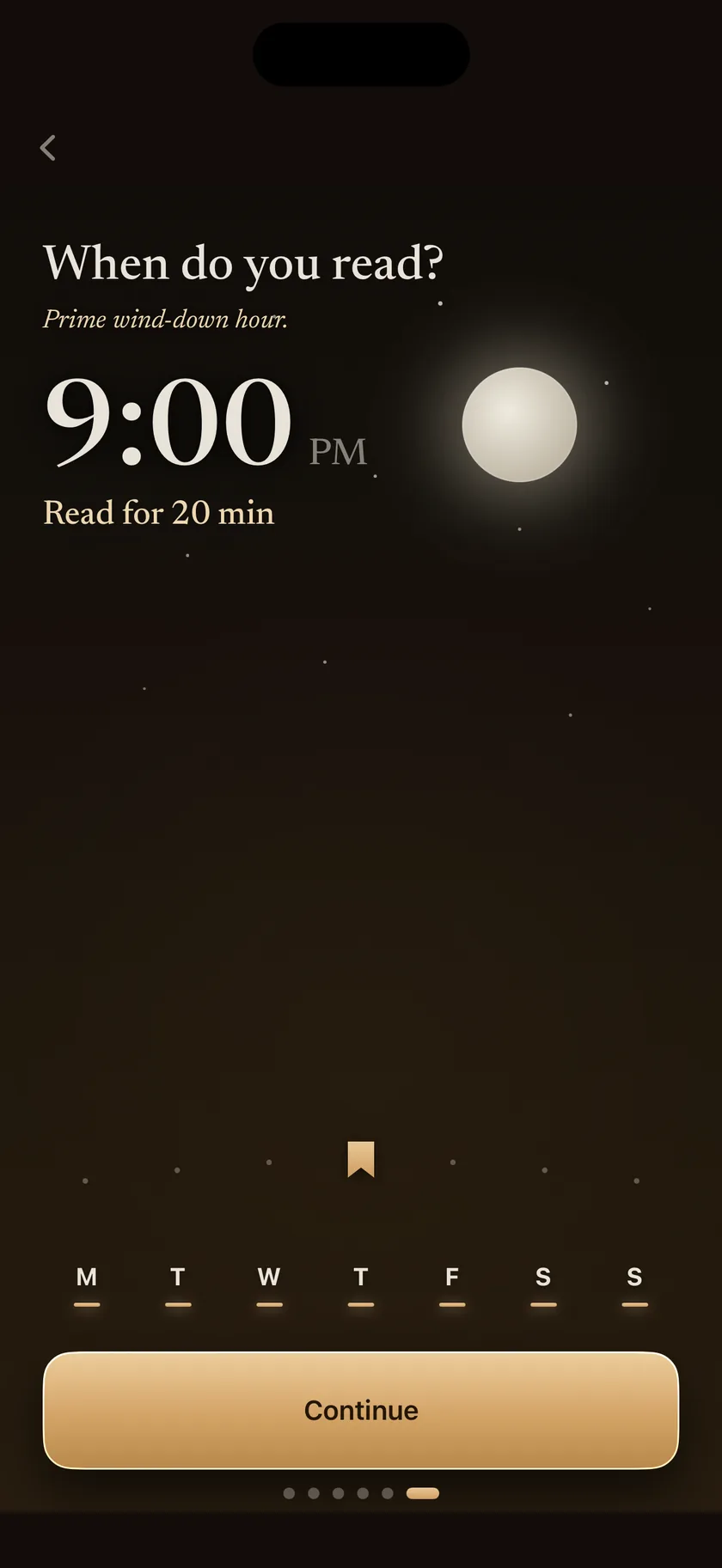
    Swipe the sundial to the time your evening actually ends. The alarm rings once a night and reaches you through Silent mode and Focus, because it is a real alarm and not a notification.

  2. Show the book to start

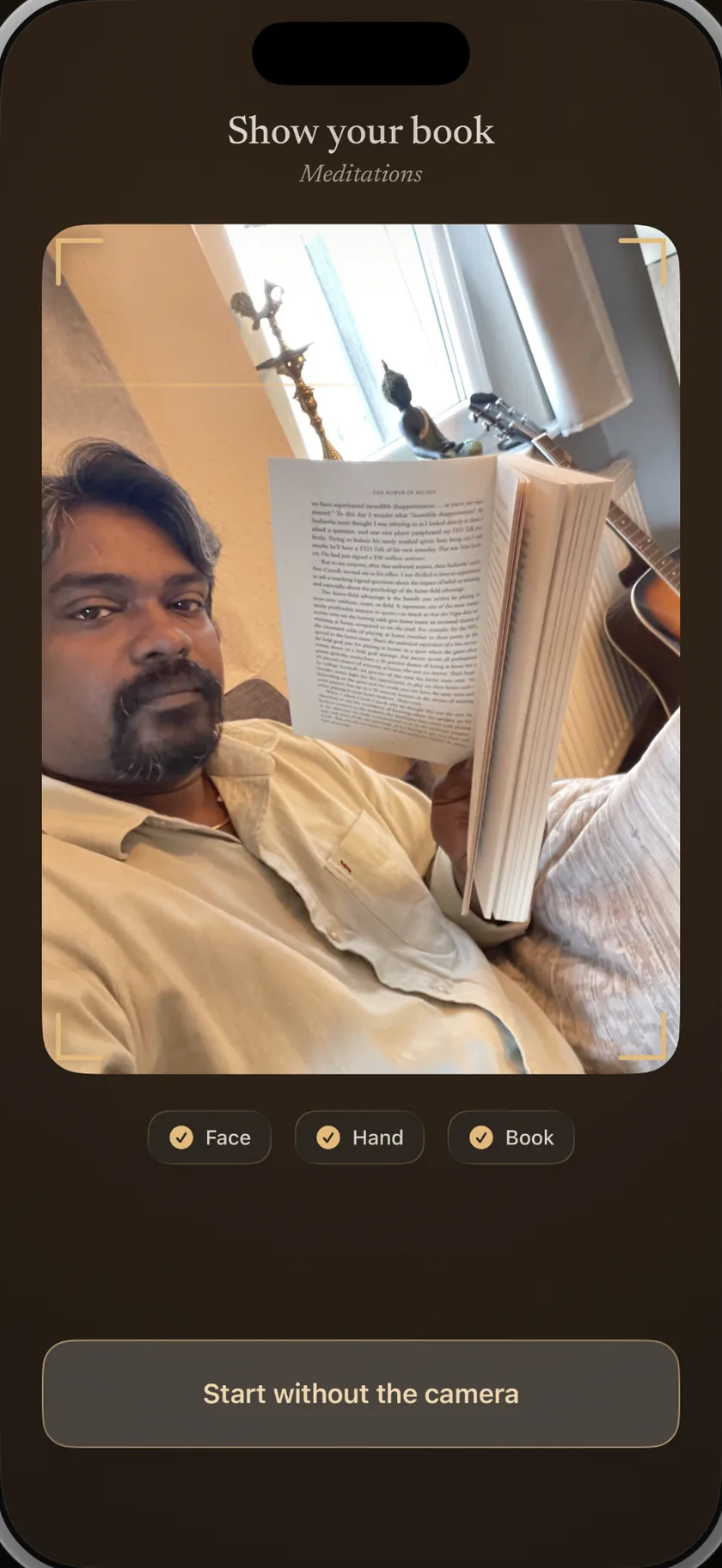
    When it rings, hold the book up to the camera. That is the gate: BookGate takes it as the start of the session, and keeps the photo as that night’s journal entry. It never leaves the phone.

  3. Your apps stay shut while you read

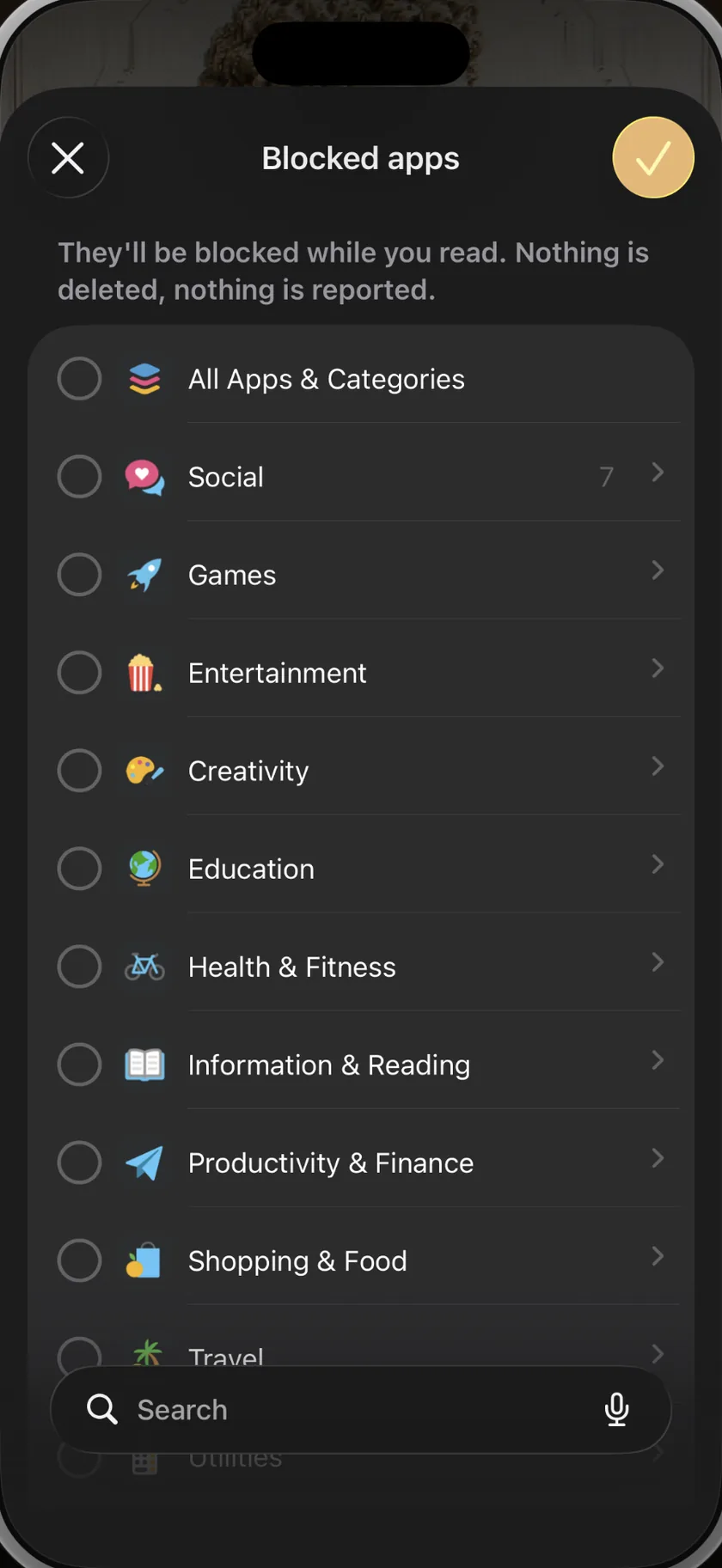
    The apps you nominated are shielded for the length of the session. Open one and you get your book’s cover instead of a feed. Twenty quiet minutes, then everything comes back on its own.

  4. Say the one thing you want to keep

    Thirty seconds, in your own voice, while the page is still warm. It is stored on the phone, and it is the part you will actually play back a month later.

What is in it

Built for one hour a day, done properly

A reading alarm that actually reaches you

One alarm, once a night, at the hour you chose. It rings through Silent mode and through Focus, the way your morning alarm does — so the evening it is easiest to skip is the one it will not let you skip quietly.

Choosing the nightly reading hour by swiping a sundial across the sky, set to 9:00 PM for twenty minutes.

Two seconds that start the night

When it rings, hold the book up to the camera. That is the gate the app is named for, and it is the whole distance between deciding to read and opening the book. The photo becomes that night’s journal entry, and it never leaves the phone.

The camera gate: a reader holding an open book up to the phone, with face, hand and book each confirmed.

An app blocker with a reason to unlock

Most app blockers on iPhone give you a wall and a willpower problem. BookGate gives the wall a door: the apps come back the moment the reading session ends. You pick which ones — the feeds, the games, the one you already know about.

The system app picker inside BookGate: whole categories — social, games, entertainment — or individual apps, chosen once and shielded during every session.

A session that is protected, not measured

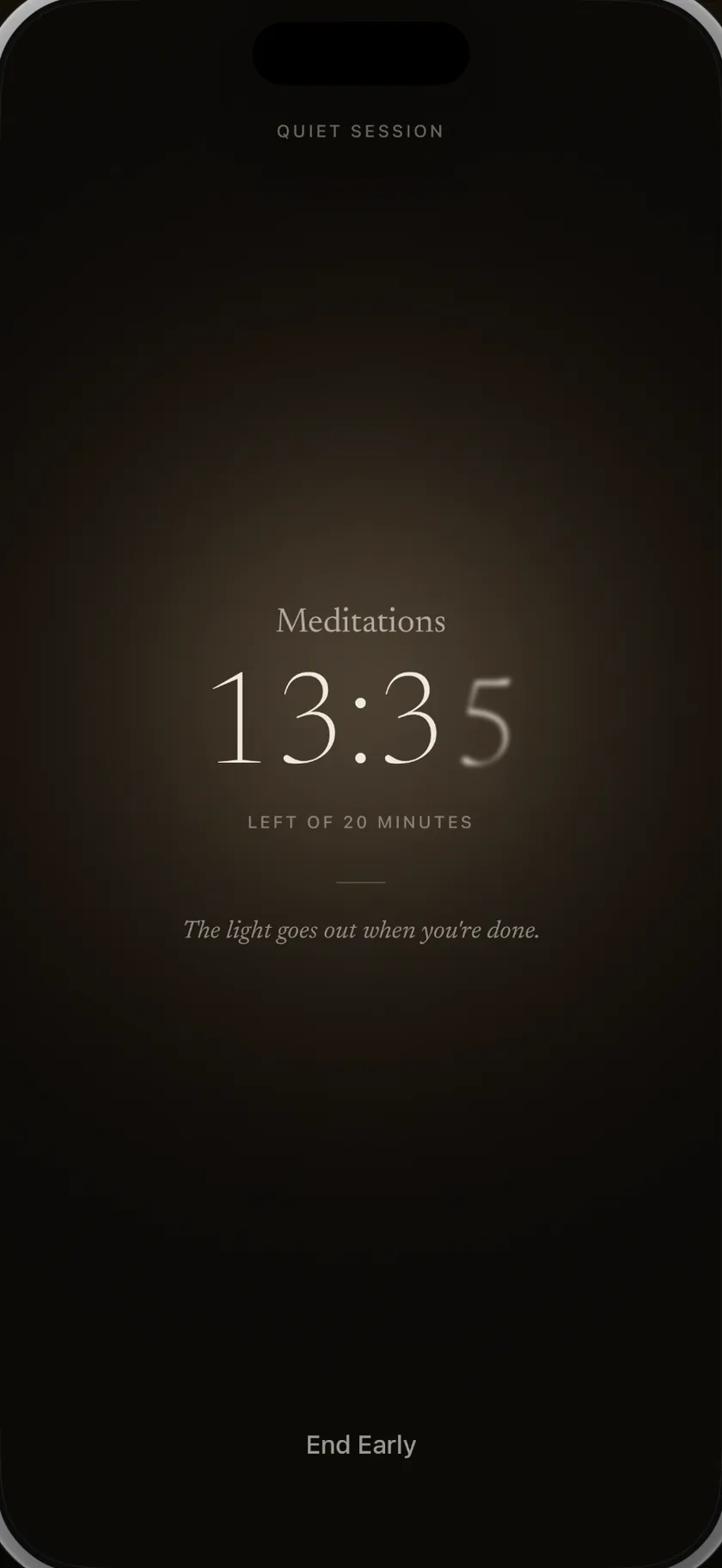
No page count, no words-per-minute, no reading speed. The timer runs, the shield holds, and when you close the session the night is done. Read past the timer and it simply keeps going.

A reading session running: the book’s title, thirteen minutes and thirty-five seconds left of twenty, and the line “the light goes out when you’re done”.

Remember what you read

Capture one thought in your own voice while the page is still fresh. The recording is filed against the book and stays on your phone for later playback. Thirty seconds is what the screen suggests, not a limit it enforces.

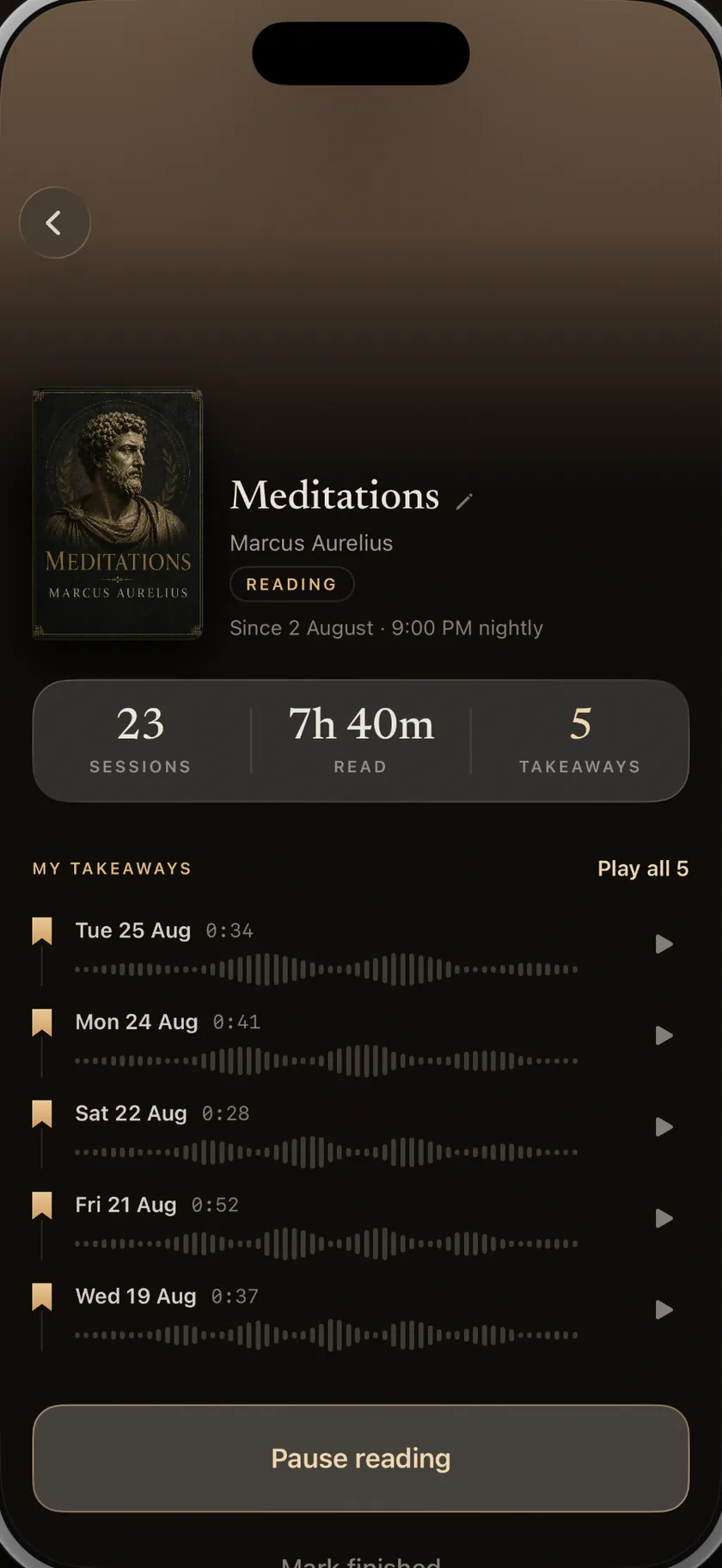
A book’s page in BookGate: cover, sessions and hours read, and the list of spoken takeaways recorded night after night.

Nights read, not pages counted

See the year as a grid of nights: the ones you read and the ones you did not. BookGate measures consistency without turning every book into a page-counting exercise.

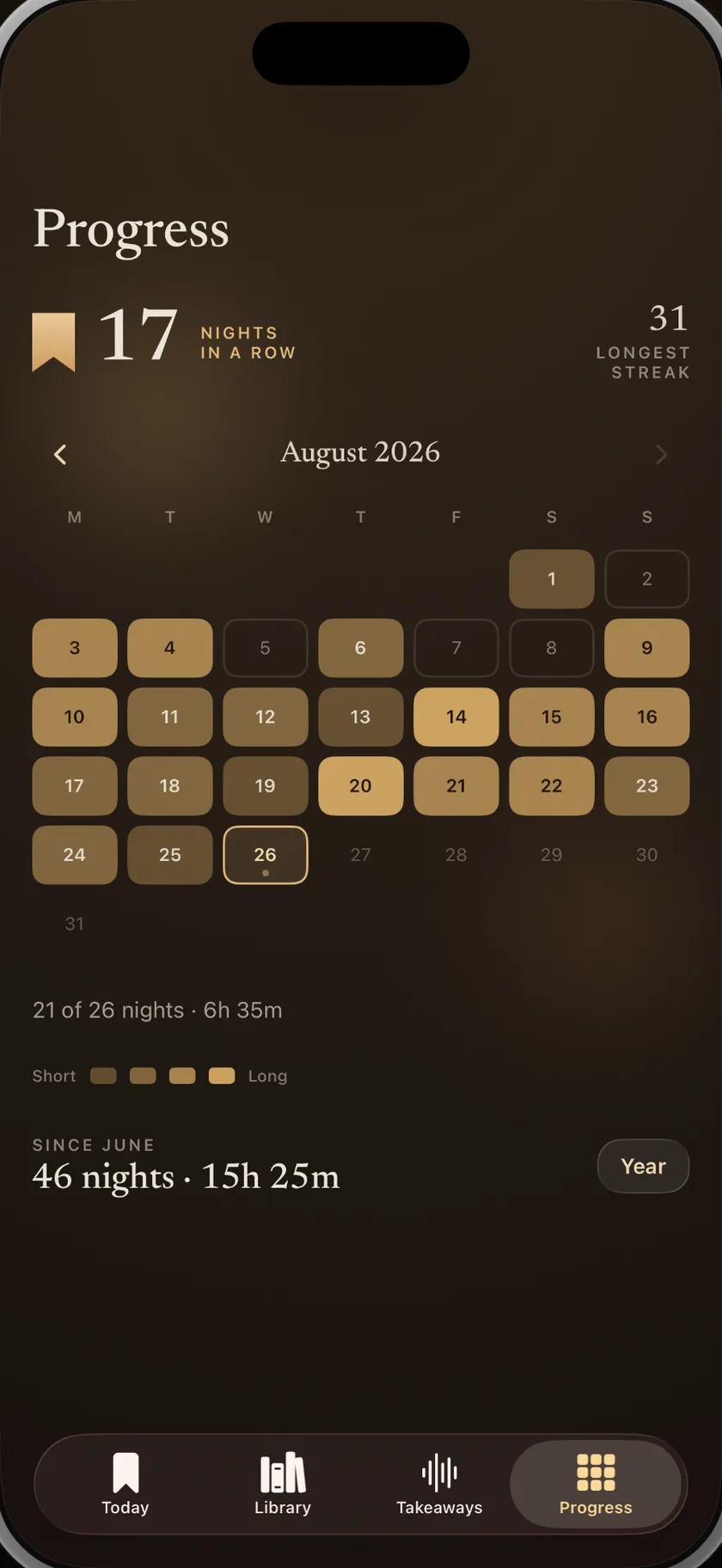
The progress screen: seventeen nights in a row, a calendar of the month with each night read marked, and the totals since June.

Independent by design

I built BookGate because I needed it

I wanted to read consistently, I already owned the books, and I usually had time in the evening. But scrolling repeatedly displaced the physical book I genuinely intended to open.

BookGate is the intervention I wanted for myself: make the decision earlier, put the book in my hands, and keep the distracting apps out of reach long enough for reading to begin.

Privacy

Your reading stays on your phone

BookGate has no account and no server holding your data. The books you add, the nightly photos, the spoken takeaways and your streak are stored on the device and nowhere else. That is also why there is no web version and nothing to sync — the trade is deliberate. The only thing the app sends is anonymous usage statistics, never your content.

  • No account, no sign-up, no email required to use the app
  • Photos and voice recordings never uploaded
  • App shielding runs through Apple’s Screen Time API — BookGate never sees which apps you open
  • Anonymous usage statistics only — not linked to you, no tracking, no ads

Start free

Try every feature free for three days

Build your first reading routine before paying. If BookGate earns a place in your evening, continue with the plan that suits you.

Best value

Yearly

Local App Store price

billed yearly

One payment for twelve months

Monthly

Local App Store price

billed monthly

Month-to-month flexibility

Eligible new subscribers pay nothing for the first 3 days

Join the waitlist

After the trial, choose a monthly or yearly subscription. The App Store shows the exact price in your local currency, including applicable taxes, before you confirm. It renews automatically unless you cancel in your Apple Account at least 24 hours before the trial or billing period ends. There is no permanently free tier or lifetime plan.

A book’s page in BookGate: the cover, the count of sessions, hours read and takeaways, and the recordings listed below them.

Guides

If you are trying to fix this yourself

Written for the problem, not for the product. Every one of them works whether or not you ever install anything.

  • The best app blockers for iPhone

    Compare iPhone app blockers by mechanism: schedules, strict modes, opening delays, physical devices and reading sessions. Updated August 2026.

    Read the guide →

  • How to stop doomscrolling

    Why doomscrolling is a design problem, not a willpower problem — the five interventions that hold up, and how to give the hour you get back somewhere to go.

    Read the guide →

  • How to read more

    Most reading advice asks for time you do not have. This is the method that works with the hour you already spend on your phone, and what to do when you stall.

    Read the guide →

  • How to start a reading habit

    A reading habit is a slot, a cue and a size — not a resolution. How to build one that survives the second week, and what to do on the night you do not want to.

    Read the guide →

  • 31 things to do instead of scrolling

    Not a list of hobbies you have no time for. Thirty-one things sized to the hour you lose to your phone, sorted by how much effort they take to start.

    Read the guide →

  • How to get back into reading

    You have not forgotten how to read. You have lost the conditions for it. A plan for restarting that assumes a wrecked attention span and a pile of unfinished books.

    Read the guide →

  • How to block apps on an iPhone

    Every way iOS can block an app — App Limits, Downtime, restrictions and the loopholes each one leaves — plus how to make a block you cannot undo in one tap.

    Read the guide →

  • How to focus while reading

    Rereading the same paragraph is not a concentration defect. It is what a mind does ten minutes after a feed. What is happening, and the five changes that fix it.

    Read the guide →

  • How to remember what you read

    Highlighting feels like remembering and is not. What to do in the five minutes after you close a book so that a month later you can still say what was in it.

    Read the guide →

Questions

Frequently asked questions

What is BookGate?

BookGate is an iPhone reading-habit app that turns part of your screen time into protected reading time. It rings at the hour you choose, asks you to show your physical book, and shields selected apps until the session ends.

How does BookGate block apps?

Through Apple’s own Screen Time framework, the same one that powers app limits in iOS Settings. You choose which apps to shield; iOS enforces it. BookGate is never told which apps you open, only that the shield is on.

Do I really have to show the book to the camera?

Yes, and it takes about two seconds. It is the gate the app is named for and starts the session; it does not claim to prove what or how much you read. The photo becomes that night’s journal entry and stays on your phone.

What if I need one of the blocked apps during a session?

You can end the session. BookGate is not a lock you cannot open — it is a wall you have to make a deliberate decision to walk through, which is the entire difference between a bad night and a habit.

Does BookGate work with ebooks or Kindle?

It works best with a physical book, because the camera gate needs a cover to see. You can run a session with anything, but the app is designed around the paper book on your table.

Is there an Android version?

No. BookGate is built specifically around Apple’s Screen Time and AlarmKit frameworks, so it is currently iPhone-only.

What does BookGate cost?

Eligible new subscribers can use every BookGate feature free for three days. After the trial, choose a monthly or yearly subscription. The App Store shows the exact price in your local currency, including applicable taxes, before you confirm. The subscription renews automatically unless you cancel in your Apple Account at least 24 hours before the trial or billing period ends.

What data does the BookGate app collect?

Nothing personal. The app has no account and no server holding your data: books, photos, recordings and streaks are stored on the device only. It sends anonymous, aggregate usage statistics — which screens are reached, whether sessions are completed — that are not linked to you, with no tracking or advertising SDK. The website separately stores your email only if you join the launch waitlist.

Not out yet

Be there the night it launches

One email when BookGate is on the App Store. Nothing else, ever, and you can unsubscribe from the same message.

Your address is used for the launch email and nothing else.